
To-Do Lists in KTO
KTO has to-do lists now. Live under ToDo in the nav, or at /todos.
The reason: KTO already tracks money, health, and job hunts. Those are structured problems with structured screens. The rest of life is "here are seven things, do them," and that kept landing in text files and phone notes. Now it lands here, next to everything else.
Lists
A list is a name plus three optional fields: - Status: Not Started, In Progress, Paused, or Complete. Paused is the one most apps skip and the one I use most. The deck project isn't dead, it's waiting for spring. - Due date: for lists that are really deadlines. "Everything before the trip on Oct 3." - Favorite: pins the list to the top of the index.
The index shows every active list with status, due date, and item count. Favorites sort first, then due date. Mark a list Complete and it drops off the index. No archive step.
Items
An item needs a name and nothing else. Type "Call the plumber", save, done. That's deliberate: if adding an entry costs more than 5 seconds, the list is abandoned by week two.
When an item needs more, it can carry:
- Status: same four states as lists. A multi-day item sits at In Progress instead of lying in either direction.
- Due date: per item, shown on the row.
- Link: a URL on the item. The item is "Buy the ceiling fan"; the link is the exact fan. No re-searching.
- Description: free-text notes, up to 10,000 characters. Measurements, confirmation numbers, the paint color you will not remember.
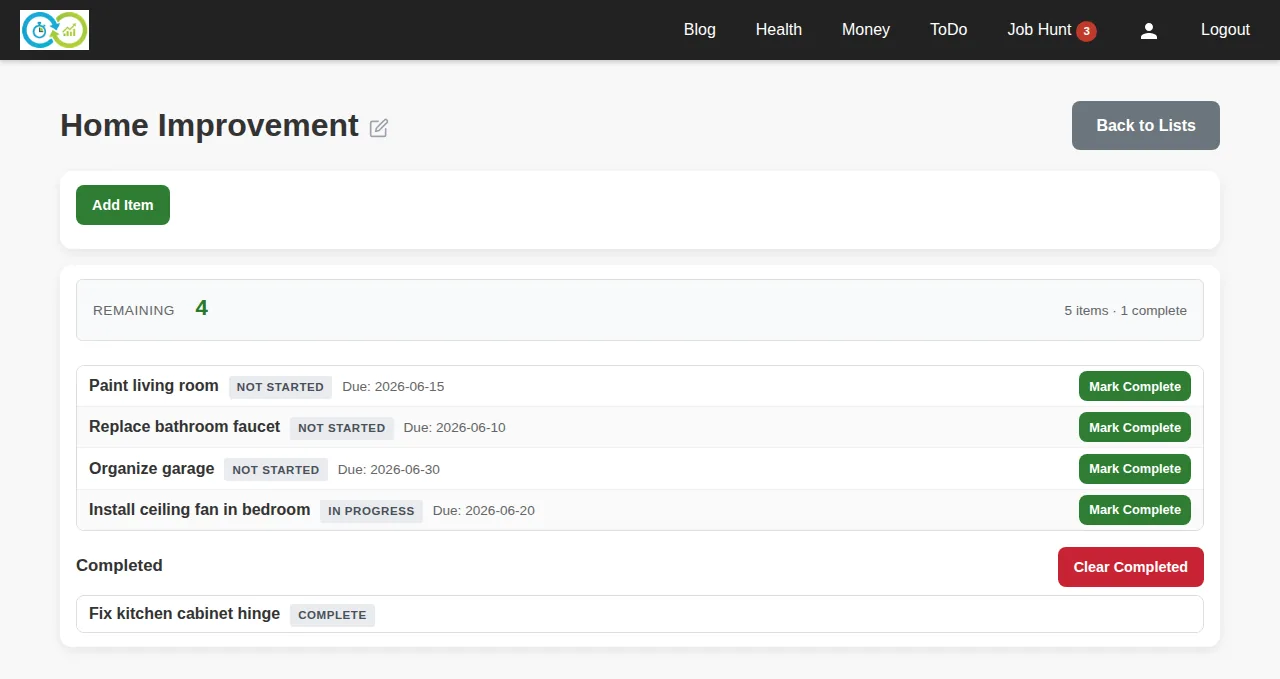
Everything on the item page happens in place. Add, edit, complete, delete: no page reloads. A summary bar keeps score: items remaining, items done.
Two clicks do most of the work. Mark Complete moves a row to a Completed section at the bottom. Clear Completed deletes the finished pile at once, after telling you how many it's about to remove.
Three lists I actually run
- Errands. Favorited, no due date, never Complete. Items are just names: "Drop off dry cleaning", "Return the drill to Dave". Every week or two I hit Clear Completed and the list is clean again. Zero ceremony.
- Home Improvement. Status In Progress. Items carry real metadata: "Install ceiling fan" has a link to the fan and the joist spacing in the description. "Get permit approved" has been In Progress for three weeks, because that's what permits do. The status column shows what's moving versus what's waiting on someone else.
- Iceland Trip. Due Oct 3, favorited so it stays on top. Item due dates work backward from the flight: renew passport (months out), book rental car (before the good prices end), pack (the night before). Trip ends, list goes Complete, list disappears.
The point
To-do lists are the hello world of software. This one exists because it lives in the same account as everything else: one login, and the packing list sits next to the trip budget. If you're already in KTO daily for the money side, keeping your lists here costs nothing.