
Balancing your accounts every month (and why it still matters)
Every bank, card issuer and loan servicer has an app that shows you a balance. Most people stop there. The trouble is that the balance is the institution's version of events. Your bank doesn't know about the check you mailed on Tuesday. Your card issuer won't point out that the internet bill went out twice. Your loan servicer won't mention that the extra $200 you sent toward principal was applied to next month's payment instead.
Balancing, or reconciling, an account means checking your own record against the statement, line by line, once a month. It sounds like something your grandparents did with a pencil and a checkbook. It takes about 15 minutes per account, and it's still the most reliable way to catch fraud, institution errors and your own mistakes while you can still do something about them.
This guide covers which accounts are worth reconciling, why it's worth doing, the tradeoffs, how to do it with nothing but a statement and a pen, how to find a difference that won't go away, and how to do it in KTO.
What reconciling actually is
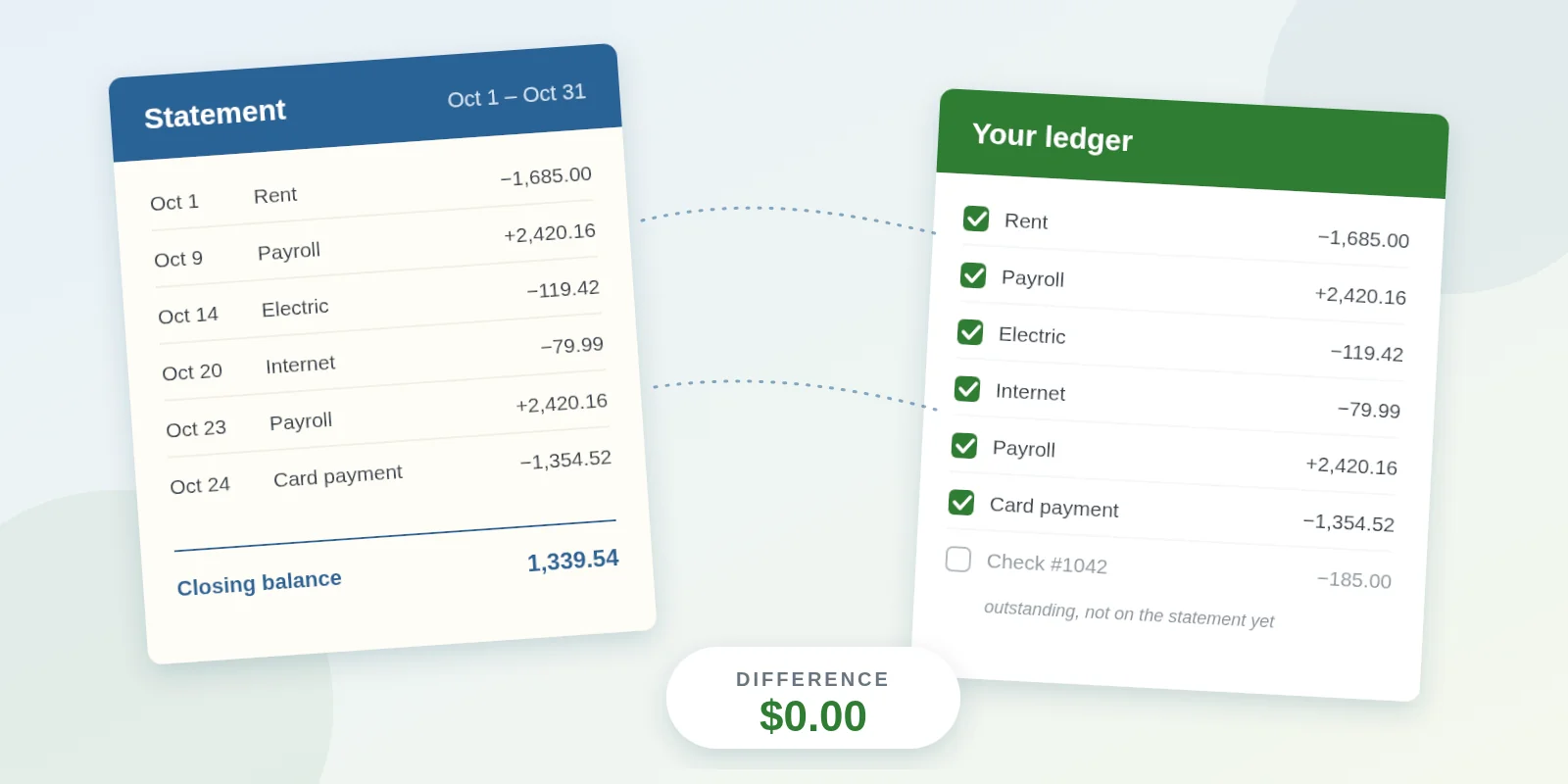
You keep a list of what went in and out of an account. The institution sends a statement that says what it saw over the same period. Reconciling is matching the two:
- Start from where you both agreed last month (the opening balance).
- Tick off every transaction that appears on both lists.
- Whatever is left over is either something the institution hasn't seen yet (a check that hasn't been cashed, a payment sent on the last day), or something you didn't know about (a fee, interest, a charge you forgot, a charge you didn't make).
- When your ticked items add up to the statement's closing balance, you're done.
The key idea is that you're not trying to make your balance match the app's balance today. You're making your record agree with the statement as of the statement date. Anything after that date waits for next month.
It's not just checking
The method is the same for every account with a statement. What changes is what tends to go wrong.
Checking and savings. The classic case. Outstanding checks, deposits in transit, bank fees, interest, and the occasional duplicate debit. Savings accounts are quiet, so a quarterly reconcile is usually enough.
Credit cards. The card statement is the one most worth reconciling, because it has the most transactions and the most room for surprises: subscriptions that renewed, a restaurant tip that posted higher than you wrote down, a merchant who charged twice, interest you didn't expect. On a card the balance is money you owe, so the direction flips: purchases, interest and fees increase it, and payments and refunds decrease it.
Loans (mortgage, auto, student, personal). Far fewer transactions, but each one matters more. Every payment is split between interest and principal, and for many mortgages escrow too. Reconciling a loan means checking that the principal balance on the statement matches yours, which catches a payment applied to the wrong bucket, an extra principal payment that was held as a prepayment of next month instead, or an escrow change nobody told you about.
The rest of this guide uses "deposits" and "withdrawals" for money in and out. On a credit card or loan, read those as "payments and credits" and "charges, interest and fees."
Why bother when the app shows a balance?
Fraud and errors have a clock on them. US consumer protections depend on how quickly you speak up, and the clock usually starts when the statement is sent:
- Debit cards and bank transfers fall under Regulation E. If a transfer you didn't make shows up on your statement, you have 60 days from the date the statement was sent to report it and owe nothing. Wait longer and you can be on the hook for transfers that happen after that window. If a card or PIN is lost or stolen, the cap is $50 when you report within two business days of noticing and $500 after that, with the same 60-day cliff.
- Credit cards fall under the Fair Credit Billing Act (Regulation Z). A billing error, such as a charge you didn't make, a wrong amount, or a payment that wasn't credited, has to be disputed in writing within 60 days after the first statement showing it was sent. Liability for unauthorized use is capped at $50, and most issuers waive even that.
- Mortgages fall under Regulation X. If a payment was misapplied or escrow was mishandled, a written notice of error obliges the servicer to acknowledge it within five business days and generally resolve it within 30. You can only send one if you noticed.
A monthly reconciliation means every statement gets read within days of arriving, which keeps you well inside those windows.
Your real balance is different from what the app says. The bank doesn't subtract checks you've written that haven't been cashed, or a payment you've scheduled for next week. If you write a $185 check to a plumber and the bank shows $1,339, you have $1,154. That gap is how people overdraw accounts they thought were fine. The same gap exists on a credit card: the statement balance is fixed on the closing date, while the current balance keeps moving.
Duplicates and forgotten charges hide in plain sight. A bill that charges twice, a free trial that turned into a paid plan, a refund that never arrived. None of these look wrong when you glance at a list of 40 transactions. They stand out immediately when you're ticking items one at a time.
Your other money tracking depends on it. If you budget, track spending by category, watch your net worth or do your own taxes, every number downstream is only as good as the ledger it came from. Reconciling is what makes the ledger trustworthy.
The honest pros and cons
| Pros | Cons |
|---|---|
| Catches fraud and billing errors within the protection window | Takes 10 to 20 minutes per account per month |
| Shows your true available balance | Only works if you record transactions as you go (or import them) |
| Finds duplicate charges and forgotten subscriptions | A stubborn $3 difference can eat an evening if you don't know where to look |
| Makes budgets, reports and net worth accurate | Feels redundant if an account is simple and everything is automatic |
Who can reasonably skip it? Someone with one checking account, one card paid in full on autopay, no paper checks, no loans, and a habit of reading every transaction in the app each week. That's a light version of the same thing. Everyone else, especially anyone who writes checks, carries a card balance, shares an account, runs a side business through personal accounts, makes extra loan payments, or has ever overdrawn, gets real value from a monthly reconcile.
How often?
Monthly, tied to each statement, is the right default. The statement gives you a fixed closing balance to aim at, and once a month is frequent enough to stay inside the dispute windows with time to spare.
Adjust by account:
- Checking and credit cards: monthly. These have the most activity and the shortest path to a problem.
- Loans: monthly if you make extra payments, otherwise quarterly is fine. Always read the annual escrow statement on a mortgage.
- Savings: quarterly for a quiet account with one transfer a month and interest. Still read each statement when it arrives.
- A weekly glance at your busiest accounts catches obvious problems early. It isn't reconciling, because there's nothing to balance against.
Pick a fixed day for each account: the weekend after its statement closes is easy to remember. If your statements close on scattered dates, many issuers will move a card's due date (and with it the closing date) on request, so you can line them up and reconcile everything in one sitting.
How to reconcile by hand
You need the statement (paper or PDF) and your own record of the month: a register, a spreadsheet, or the transaction list in whatever app you use.
- Write down the opening balance. It's last month's closing balance, and it should match the "previous balance" or "beginning balance" on this statement. If it doesn't, stop: something changed in a month you already balanced, and you need to fix that first.
- Tick the deposits. For each deposit, payment or credit on the statement, find it in your record and tick both. These are usually few and large, so this is quick.
- Tick the withdrawals. Same again for every check, purchase, transfer and bill payment. Go in date order on the statement and look for the matching amount in your record.
- Add what you didn't know about. Anything on the statement that isn't in your record (a monthly fee, interest charged or earned, an automatic payment you forgot) gets added to your record now, then ticked. Anything you don't recognize gets circled for a call to the institution.
- List what the institution hasn't seen. Items in your record dated before the statement end that aren't on the statement are outstanding: checks not cashed yet, a deposit or card payment made on the last day. Write them down.
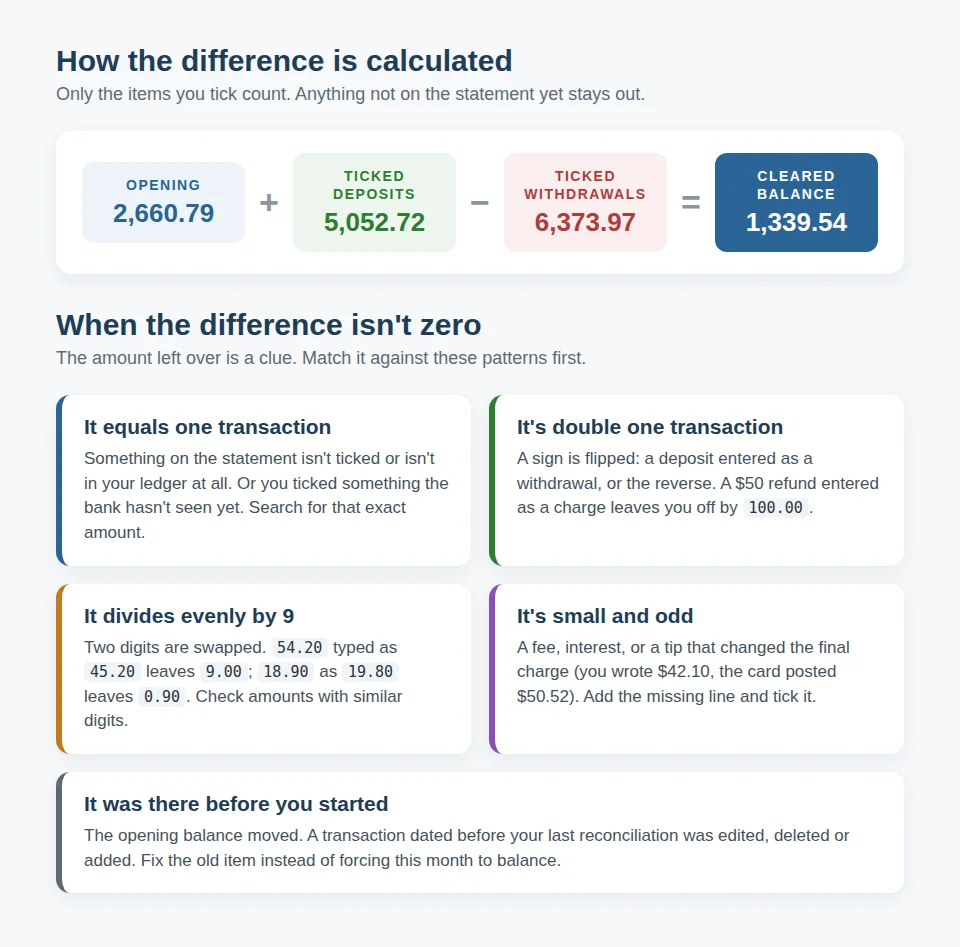
- Do the math. Opening balance, plus ticked deposits, minus ticked withdrawals, should equal the statement's closing balance. If it does, you're done.
Credit card notes
- Reconcile to the statement balance on the closing date, not the current balance the app leads with.
- A payment you sent after the closing date is outstanding. It belongs to next month's statement.
- Interest and fees are the lines most often missing from your record. Add them as their own transactions so the cost of carrying a balance shows up in your reports.
- Watch the amounts on restaurant and hotel charges. The amount that posts can differ from the receipt you wrote down.
Loan notes
- Record each payment as it leaves your checking account, and record the interest portion on the loan separately (or split the payment), so the loan's balance moves by principal only.
- Compare the statement's principal balance with yours. If you sent extra toward principal, make sure the statement shows it applied to principal, not held for next month.
- On a mortgage with escrow, the escrow part of the payment doesn't reduce the loan at all. A change in the payment amount usually means the escrow was recalculated.
When the difference isn't zero
Most of the time it balances on the first pass. When it doesn't, the size of the leftover amount usually tells you what kind of mistake you're looking for:
- It equals one transaction exactly. Something wasn't ticked, or it's on the statement but not in your record, or you ticked something the institution hasn't seen. Search both lists for that amount.
- It's exactly double one transaction. A sign is flipped. A $50 refund recorded as a $50 charge puts you $100 off. This is the most common mistake on credit cards, where the direction of everything is reversed.
- It divides evenly by 9. Two digits are swapped: 54.20 typed as 45.20 is off by 9.00. This is a quirk of arithmetic that's surprisingly reliable for finding typos.
- It's a few dollars or cents. Look for a fee, interest, or a charge where the tip changed the final amount after you wrote it down.
- It was there before you started. If your opening balance doesn't match the statement's beginning balance, the problem is in a month you already closed. Someone edited, deleted or back-dated a transaction. Fix that month rather than forcing this one to balance.
If you've been through all five and it's still off, take a break and come back. Most stubborn differences are found in the first two minutes of the second attempt.
Doing it in KTO
KTO's Money section has a reconciliation built for exactly this routine, and it works the same way for checking, savings, credit card and loan accounts. Your transactions are already in the ledger, either typed in, imported from your institution's QIF export or pulled in by bank sync, so the work is just the ticking.
The example below is the demo account's checking account, reconciling the October statement. September was reconciled a month ago.
1. Start from the statement
Open Money → Reconciliation. Each account shows when it was last reconciled and whether a reconciliation is due, in progress or up to date. Click Reconcile next to the account and enter two things from your statement: the statement end date and the closing balance.
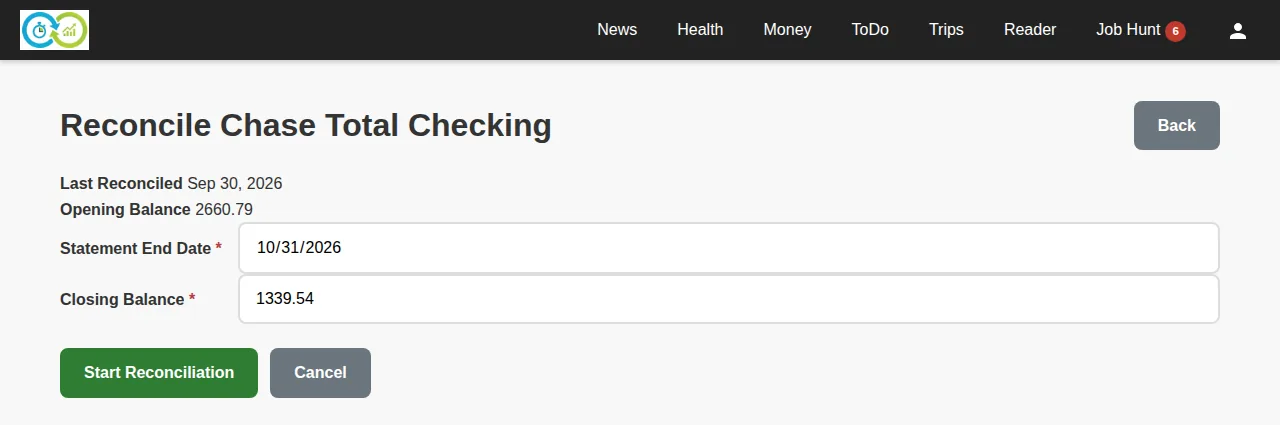
You don't type the opening balance. KTO carries it forward from your last finished reconciliation, which is exactly the "start from where you agreed last month" step.
For a credit card or loan, enter the closing balance as a negative number, because it's money you owe. If you type a positive balance on one of those accounts, KTO asks whether you meant it before going on.
2. Tick what's on the statement
The next page lists every transaction in the account that hasn't been reconciled yet, oldest first, with five numbers across the top: when you last reconciled, the opening balance, the statement's closing balance, the cleared total of everything you've ticked, and the difference between the two.
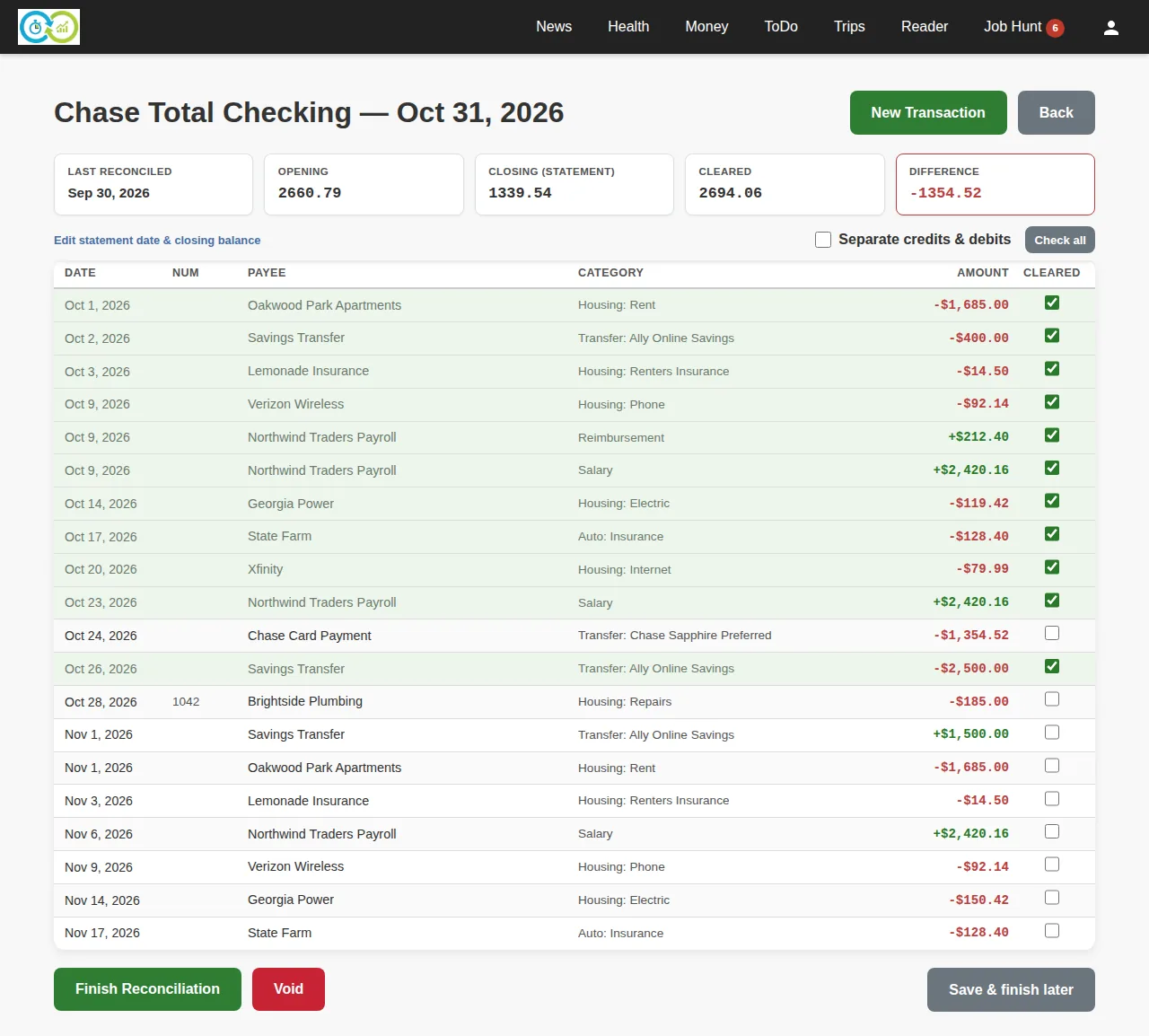
Go down your statement and tick each matching row. The cleared total and difference update with every tick. In the screenshot, eleven of the October items are ticked and the difference is −1,354.52, which happens to be exactly the card payment on Oct 24 that hasn't been ticked yet. That's the "equals one transaction" pattern from the cheat sheet above.
That card payment is a transfer, so it also appears on the credit card's side as a payment. When you reconcile the card, you'll tick it there too. Each account is reconciled against its own statement.
A few things on this page earn their place:
- Separate credits & debits splits the list into money in and money out, which is easier if your statement lists them that way.
- New Transaction adds anything on the statement that's missing from your ledger (a fee, interest) without leaving the page. Add it, then tick it.
- Save & finish later keeps your ticks. The account shows as In progress until you come back.
- Check all ticks every row on the page, including items dated after the statement. It's handy for a first reconciliation of an old account where you know everything has cleared. For a normal month, tick by hand.
3. Leave outstanding items alone
Tick the card payment and the difference drops to 0.00.
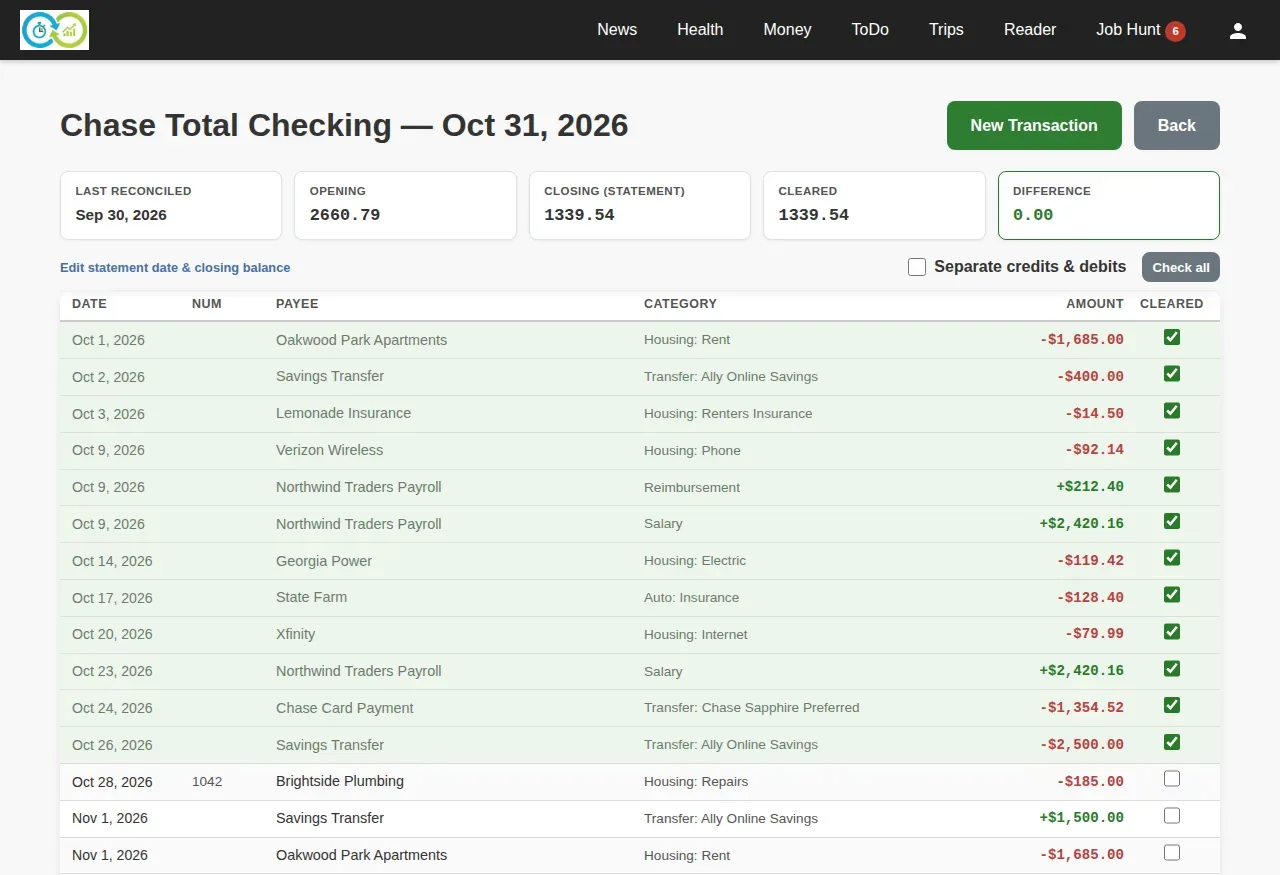
Check #1042 to the plumber, written Oct 28, stays unticked: the plumber hasn't deposited it, so it isn't on the statement. That's correct. It will still be in the list next month, waiting to be ticked when it clears. The November items below it stay unticked too, because they're after the statement date.
Click Finish Reconciliation. Every ticked transaction is marked reconciled and drops out of future reconciliations, and the account's "last reconciled" date moves to Oct 31.
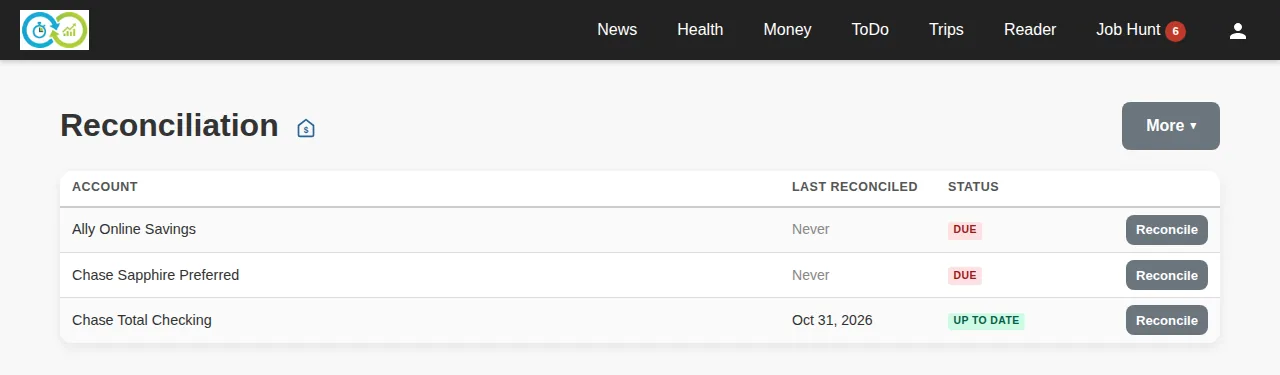
The savings account and the credit card are next. The steps are identical: enter each statement's date and closing balance, tick, finish.
If it won't balance
KTO won't quietly finish with a difference. If you've hunted and can't find it (and the amount is small enough that you've decided to live with it), you can finish anyway after an explicit confirmation. KTO remembers the gap, and next month's opening balance shows it as drift, so it never disappears silently.
If you made a mistake partway through, Void abandons the reconciliation without changing anything.
Bank sync and reconciliation
If you use bank sync, transactions arrive on their own each night. It's tempting to think that makes reconciling pointless, since the institution put them there. It doesn't. Bank sync brings in what the institution posted. It can't know about the check you wrote and haven't recorded, a charge you didn't make, or a duplicate you typed by hand before the sync arrived. Reconciling is still the step where you look at each item and decide it's right. The difference is that the typing is gone, so it takes five minutes instead of fifteen.
A 15-minute monthly routine
For each account whose statement arrived this month:
- Open the statement the same week it arrives.
- Make sure your ledger has everything up to the statement date (import or type the stragglers).
- Start the reconciliation with the statement's end date and closing balance (negative for cards and loans).
- Tick money in, then money out, in statement order.
- Add fees and interest you didn't have; circle anything you don't recognize.
- Leave outstanding items and anything after the statement date unticked.
- Difference at zero? Finish. Not zero? Run the five checks above.
- Call the institution about anything circled. Today, not next month.
Do it three months in a row and it stops feeling like a chore. It turns into the 15 minutes where you actually know where your money is.
This article is general information, not financial or legal advice. Dispute rights and liability limits depend on the account type, where you live and your account agreement.
Related: Import, Reconciliation, Reports & Search · Money in KTO · Tracking recurring bills and subscriptions