
Job Hunt
Job Hunt tracks a job search end to end: which companies you've applied to, what stage each application is at, when to follow up, and how it all went. Open Job Hunt from the navigation bar.
On this page: Hunts · Applications & stages · Follow-ups · AI research · The flow chart · Documents & skills
Hunts
A hunt is one job search (e.g. "Senior Engineer Search 2026") — everything else lives inside it. Required: just a name. Optional: desired salary, equity, and bonus, a description of the job you want, and notes. Most people have one active hunt at a time; old hunts keep their history.
Deleting a hunt asks you to type its name to confirm, and takes its applications and history with it (uploaded documents stay in your library).
Applications and stages
An application is one company + role. Required: company and role title. Optional: the job posting text or link, location, salary range, contact details, notes, and more.
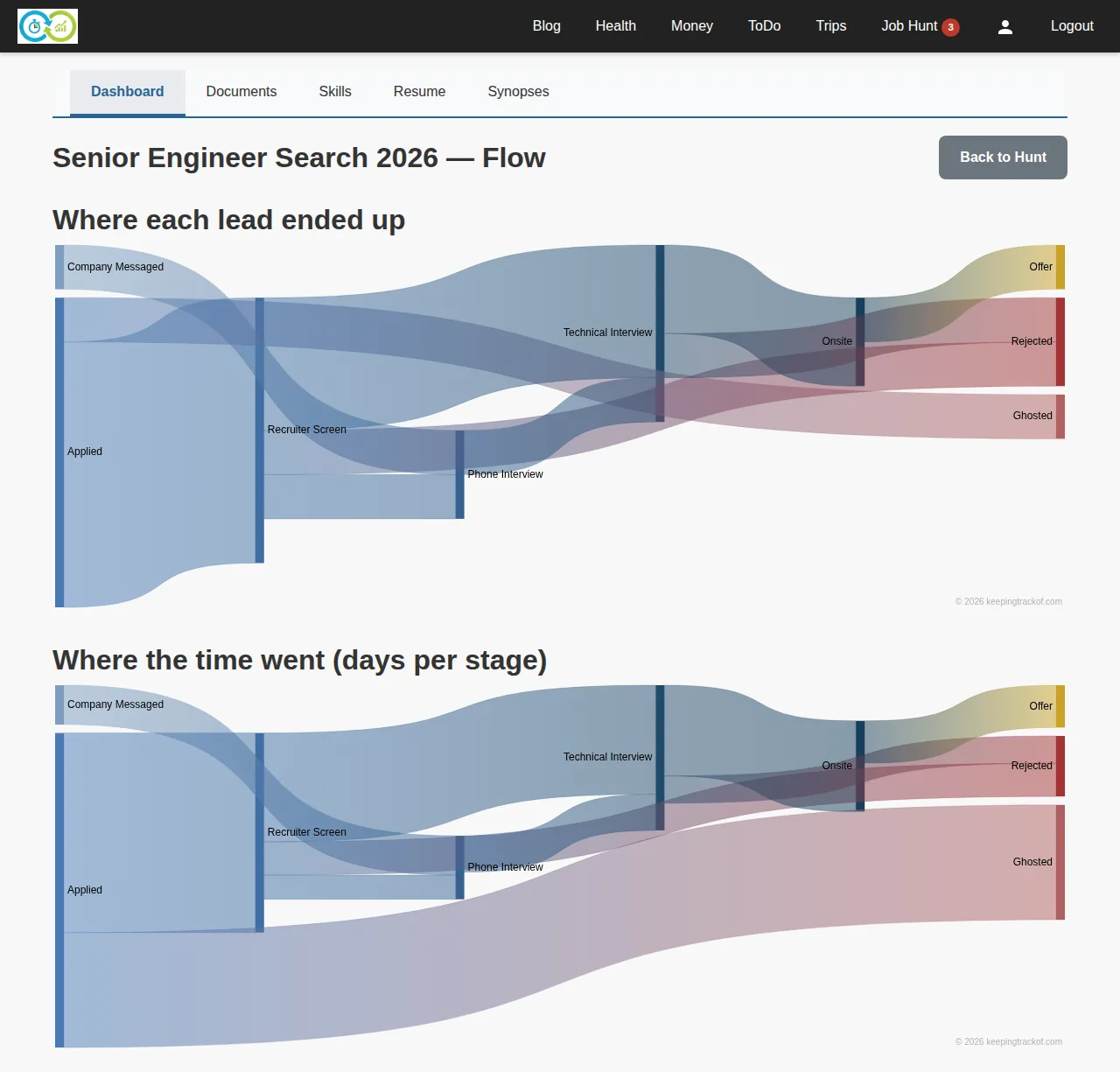
Progress is tracked as stage events: applied, recruiter screen, phone interview, technical interview, onsite, offer, rejected, ghosted, … Record a stage change on the application page — the stage is required, and you can backdate the event and attach a note. The full stage history stays on the application, which is what powers the flow chart below.
Closing an application (rejected, withdrew, accepted) records why and when.
Follow-ups
Any application can have follow-up reminders ("chase the recruiter Friday"). The note and due date are what matters; due follow-ups show as a badge on Job Hunt in the navigation bar so nothing slips.
AI research
The AI helpers are part of the AI add-on subscription ($10/month, managed on your profile's subscription page); without it the sections below show an "AI add-on required" card and a sparkle icon marks the links. Two AI helpers work from your data:
- Fit analysis compares your resume against an application's job posting and scores the match, pointing at gaps. It needs the posting text on the application and a resume in the Resume Builder.
- Synopses research a company or interviewer by name and summarize what's public — funding, product, culture signals. Required: the subject's name and type (company or person).
The flow chart
Each hunt has a flow (Sankey) view showing where every application went — how many made it from applied to screen to interview to offer, and where time was spent:
Documents and skills
The document library stores resumes and cover letters (pdf, doc, docx, txt, md, png, jpg — 10 MB each). Required: the file itself; typing and attaching it to a hunt are optional. Documents can also be attached straight to an application.
Skills is your self-assessed skill list (name required, confidence level per skill) — it feeds fit analysis and the resume builder. "Fill Skills from Resume" reads your resume with AI and needs the AI add-on.